Podatności pod kontrolą. Dowody gotowe na audyt.
IT wie, co naprawić najpierw. Zarząd widzi, czy ryzyko jest obsługiwane w terminie. Audytor dostaje dowody dla KSC/NIS2 i ISO 27001. Administrator instaluje jeden skrypt na serwerze Linux, a pierwszy skan trwa kilka minut.
Bez karty kredytowej · Skan lokalnie na Twoim serwerze · Dane w Polsce (OVHcloud Warszawa)
Pytania? Napisz do nas
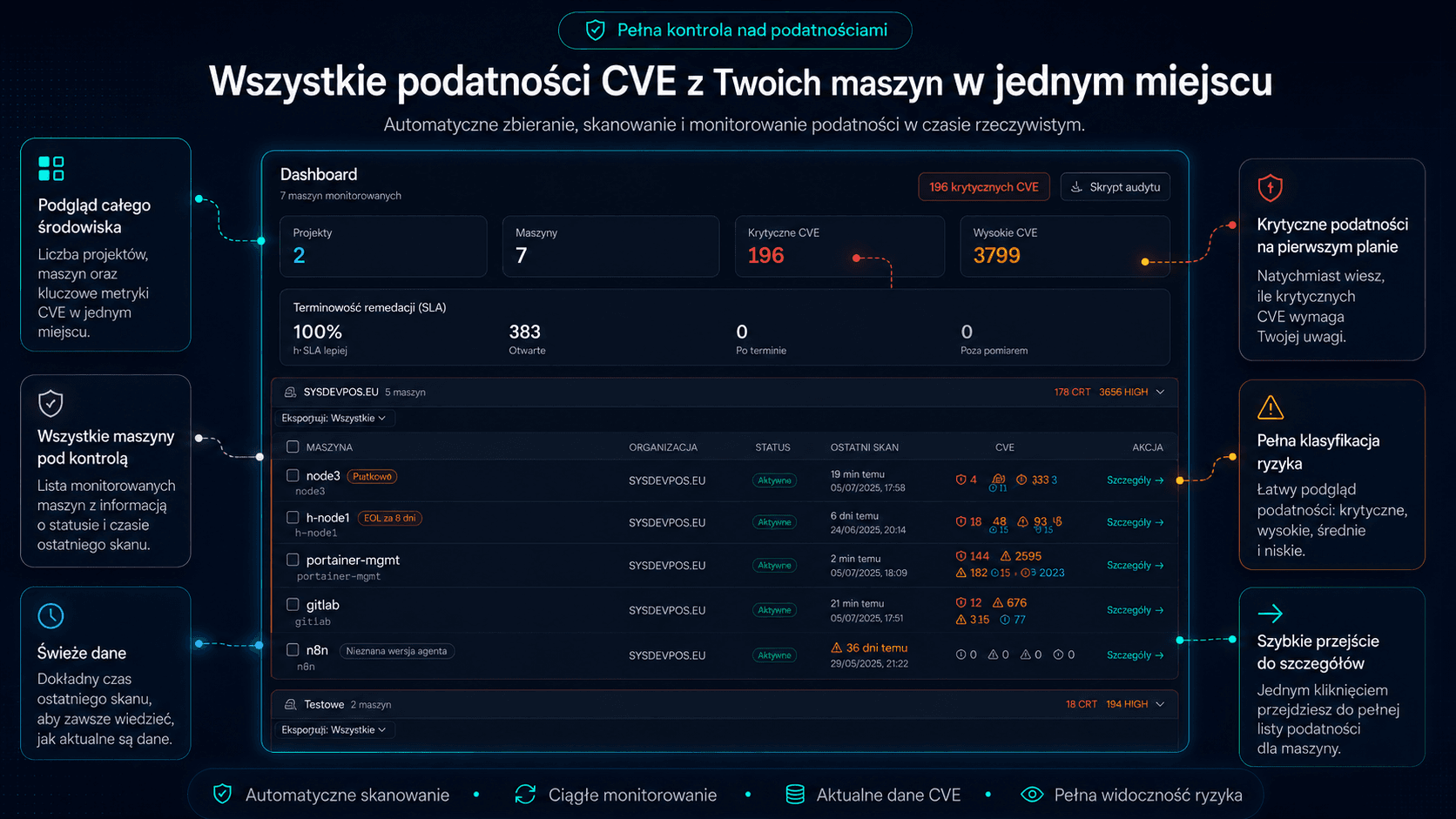
Zobacz działający panel
Przykładowa firma z danymi: werdykt dla zarządu, terminowość napraw, priorytety i raporty. Bez rejestracji.
Otwórz demoCzy podlegasz pod KSC/NIS2?
Dwa krótkie pytania o sektor i wielkość dają niewiążące wskazanie.
SprawdźZobacz, co dostaje audytor
Prawdziwy Evidence Pack na fikcyjnych danych: raporty PDF, rejestry CSV, manifest SHA-256. Bez rejestracji.
Zobacz przykładCzy Secvalis się opłaca?
Twoje godziny i stawka wobec abonamentu. Wynik pokazuje też sytuację, gdy wychodzi drożej.
PoliczOd wykrycia do dowodu w sześciu krokach
- 1
Wykryj
Agent skanuje host Linux i obrazy uruchomionych kontenerów.
- 2
Priorytet
Zadania pakietowe porządkują pracę nad podatnościami. CVSS, EPSS i KEV pomagają ocenić podatność.
- 3
Właściciel
Plan działań łączy przypisane, otwarte znaleziska z osobą i terminem SLA.
- 4
Decyzja
Akceptacja ryzyka ma uzasadnienie, właściciela i datę przeglądu. Decyzje „nie dotyczy” uzasadniają wyłączenie objętych CVE z SLA i trafiają do osobnej sekcji raportu.
- 5
SLA
Konto ustawia terminy naprawy, a próg KEV może je skrócić.
- 6
Dowód
Evidence Pack łączy raporty, rejestry, dane i manifest SHA-256.
Ustawa o KSC już obowiązuje. Audytor zapyta o zarządzanie podatnościami - miej gotowe dowody.
Od 3 kwietnia 2026 r. znowelizowana ustawa o Krajowym Systemie Cyberbezpieczeństwa (wdrażająca dyrektywę NIS2) obejmuje, według Ministerstwa Cyfryzacji, około 38 tys. podmiotów w Polsce, w tym około 27 tys. podmiotów publicznych. Jednym z obowiązkowych środków zarządzania ryzykiem jest obsługa i ujawnianie podatności, a przy audycie trzeba umieć wykazać, że ten proces działa i jest udokumentowany.
Terminarz KSC
Daty dotyczą podmiotów, które spełniały kryteria 3.04.2026. Kto spełnił je później, ma co do zasady sześć miesięcy od tego momentu i liczy własne terminy.
- Okno wniosków zamknięte3.10.2026
Termin wpisu do Wykazu podmiotów kluczowych i ważnych (samorejestracja: złożenie wniosku; część podmiotów wpisywana z urzędu)
Inwentaryzacja maszyn i podatności = wiesz, co masz, zanim to zadeklarujesz.
- Następny etap3.04.2027
Wdrożenie środków zarządzania ryzykiem (w tym proces obsługi podatności)
Skan według harmonogramu ustawionego przez administratora, priorytetyzacja EPSS/KEV, statusy i audit trail = działający, udokumentowany proces.
- 3.04.2028
Pierwszy audyt cyberbezpieczeństwa podmiotów kluczowych, które wcześniej nie były operatorami usług kluczowych (potem co 3 lata)
Evidence Pack: raporty PDF, CSV z historią decyzji, manifest SHA-256 - dowody z obszaru zarządzania podatnościami w jednym ZIP.
Mapa wymogów
A.8.8
Zarządzanie podatnościami technicznymi
Co robi produkt
Zadania pakietowe porządkują pracę nad podatnościami. Kontekst maszyny zmienia kolejność napraw, nie istotność CVE. Konto ustawia terminy naprawy, a próg KEV może je skrócić. EOL wymaga planu migracji i ważnej akceptacji ryzyka. Akceptacja ryzyka ma uzasadnienie, właściciela i datę przeglądu.
Dowód
Evidence Pack łączy raporty, rejestry, dane i manifest SHA-256. Plan działań łączy przypisane, otwarte znaleziska z osobą i terminem SLA. Kontrola wskazuje maszyny bez wpisów SLA lub z rejestrem starszym od pełnego skanu. EOL wymaga planu migracji i ważnej akceptacji ryzyka. Akceptacja ryzyka ma uzasadnienie, właściciela i datę przeglądu.
A.5.18, A.8.15
Prawa dostępu i rejestrowanie zdarzeń
Co robi produkt
AUDITOR czyta artefakty konta i dane maszyn w swoim zakresie, bez edycji. Dziennik zapisuje decyzje i zdarzenia oraz umożliwia eksport do CSV.
Dowód
AUDITOR czyta artefakty konta i dane maszyn w swoim zakresie, bez edycji. Dziennik zapisuje decyzje i zdarzenia oraz umożliwia eksport do CSV.
Art.21(2)(a)
Polityki analizy ryzyka i bezpieczeństwa systemów informatycznych
Co robi produkt
Produkt tworzy edytowalny szablon polityki zarządzania podatnościami z progami konta. Konto ustawia terminy naprawy, a próg KEV może je skrócić.
Dowód
Produkt tworzy edytowalny szablon polityki zarządzania podatnościami z progami konta.
Art.21(2)(e)
Bezpieczeństwo nabywania, rozwoju i utrzymania systemów, w tym obsługa podatności
Co robi produkt
Zadania pakietowe porządkują pracę nad podatnościami. CVSS, EPSS i KEV pomagają ocenić podatność.
Dowód
Evidence Pack łączy raporty, rejestry, dane i manifest SHA-256. Decyzje „nie dotyczy” uzasadniają wyłączenie objętych CVE z SLA i trafiają do osobnej sekcji raportu. Skan nieudany, częściowy lub z wykrytym gwałtownym spadkiem znalezisk nie zamyka podatności.
Art.23
Zgłaszanie znaczących incydentów bez zbędnej zwłoki od uzyskania wiedzy: ostrzeżenie do 24 h, zgłoszenie do 72 h; dla dostawców usług zaufania zgłoszenie do 24 h
Co robi produkt
Rejestr incydentów z historią i dokumentem do przygotowania zgłoszenia.
Dowód
Rejestr incydentów z historią i dokumentem do przygotowania zgłoszenia.
A.5.36
Zgodność z politykami, zasadami i standardami bezpieczeństwa informacji
Co robi produkt
Mapa wskazuje dostępne dane w produkcie oraz obszary wymagające dowodów spoza niego. Rejestr śledzi lokalizację i terminy przeglądów dowodów. Zamrożenie zapisuje zestaw danych raportowych okresu z sumą SHA-256. Evidence Pack łączy raporty, rejestry, dane i manifest SHA-256.
Dowód
Mapa wskazuje dostępne dane w produkcie oraz obszary wymagające dowodów spoza niego. Rejestr śledzi lokalizację i terminy przeglądów dowodów. Zamrożenie zapisuje zestaw danych raportowych okresu z sumą SHA-256. Evidence Pack łączy raporty, rejestry, dane i manifest SHA-256.
Art.21(2)(f)
Ocena skuteczności środków zarządzania ryzykiem
Co robi produkt
Werdykt ocenia stan procesu napraw i decyzji, nie samą liczbę CVE. Raport zarządczy można wysyłać cyklicznie do uprawnionych odbiorców.
Dowód
Raport zarządczy można wysyłać cyklicznie do uprawnionych odbiorców. Werdykt ocenia stan procesu napraw i decyzji, nie samą liczbę CVE.
Secvalis wspiera realizację wybranych wymagań ustawy o KSC i dyrektywy NIS2 w obszarze zarządzania podatnościami. Nie zastępuje pełnego wdrożenia SZBI, audytu zgodności ani porady prawnej. Zakres obowiązków Twojej organizacji zależy od jej klasyfikacji - zweryfikuj go z doradcą.
Jeden proces, dwa spojrzenia
Dla zarządu
- Werdykt ocenia stan procesu napraw i decyzji, nie samą liczbę CVE.
- Konto ustawia terminy naprawy, a próg KEV może je skrócić.
- Kontrola wskazuje maszyny bez wpisów SLA lub z rejestrem starszym od pełnego skanu.
- Akceptacja ryzyka ma uzasadnienie, właściciela i datę przeglądu.
- EOL wymaga planu migracji i ważnej akceptacji ryzyka.
- Raport zarządczy można wysyłać cyklicznie do uprawnionych odbiorców.
Dla zespołu IT
- Zadania pakietowe porządkują pracę nad podatnościami.
- CVSS, EPSS i KEV pomagają ocenić podatność.
- Kontekst maszyny zmienia kolejność napraw, nie istotność CVE.
- Kontekst odróżnia pakiety nieuruchomionego jądra i potrzebę restartu.
- Plan działań łączy przypisane, otwarte znaleziska z osobą i terminem SLA.
Zainstaluj agenta, uruchom skan, ustaw harmonogram
Pobierz
Pobierz skrypt z linku w panelu i nadaj mu prawo wykonania.
Uruchom z kluczem
Agent skanuje host Linux i obrazy uruchomionych kontenerów.
Skan cykliczny
--schedule-help pokazuje przykłady cron i systemd.
Przykładowa sesja: pobranie skryptu i pierwszy skan.
Co opuszcza serwer
Agent przesyła metadane maszyny, skanu i wykrytych podatności.
Z maszyny wychodzą: etykieta, nazwa hosta, dystrybucja i jej wersja, wersja agenta, strefa czasowa i status skanu, a dla każdej podatności identyfikator, pakiet i jego wersja, wersja naprawiająca, istotność, tytuł, skrócony opis i odsyłacz.
Pełna widoczność Twojej floty
Od widoku całej floty do szczegółów pojedynczego CVE - każdy ekran zaprojektowany pod szybki triage.
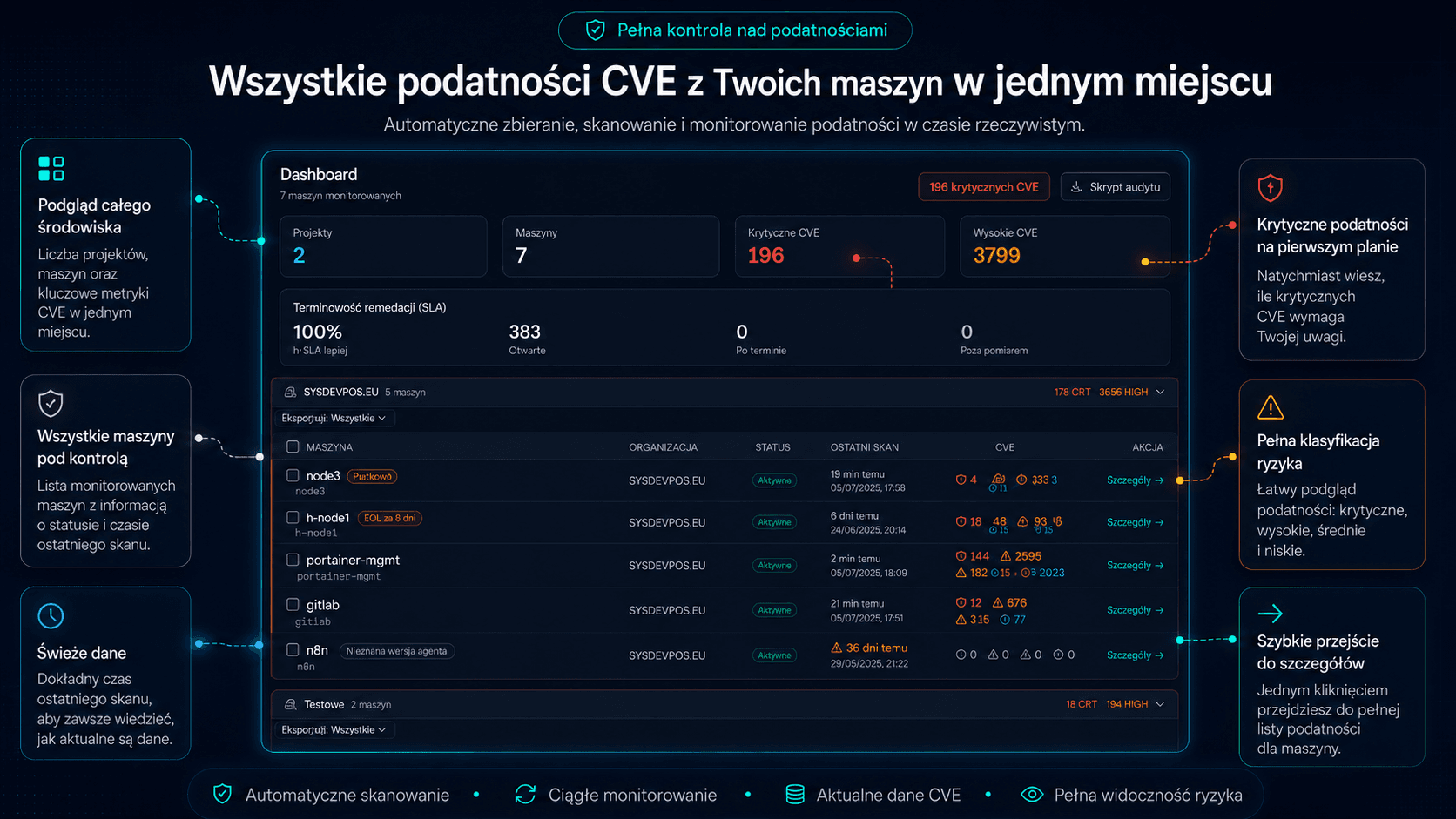
Dashboard zestawia projekty, maszyny, krytyczne CVE, SLA i ostatnie skany.
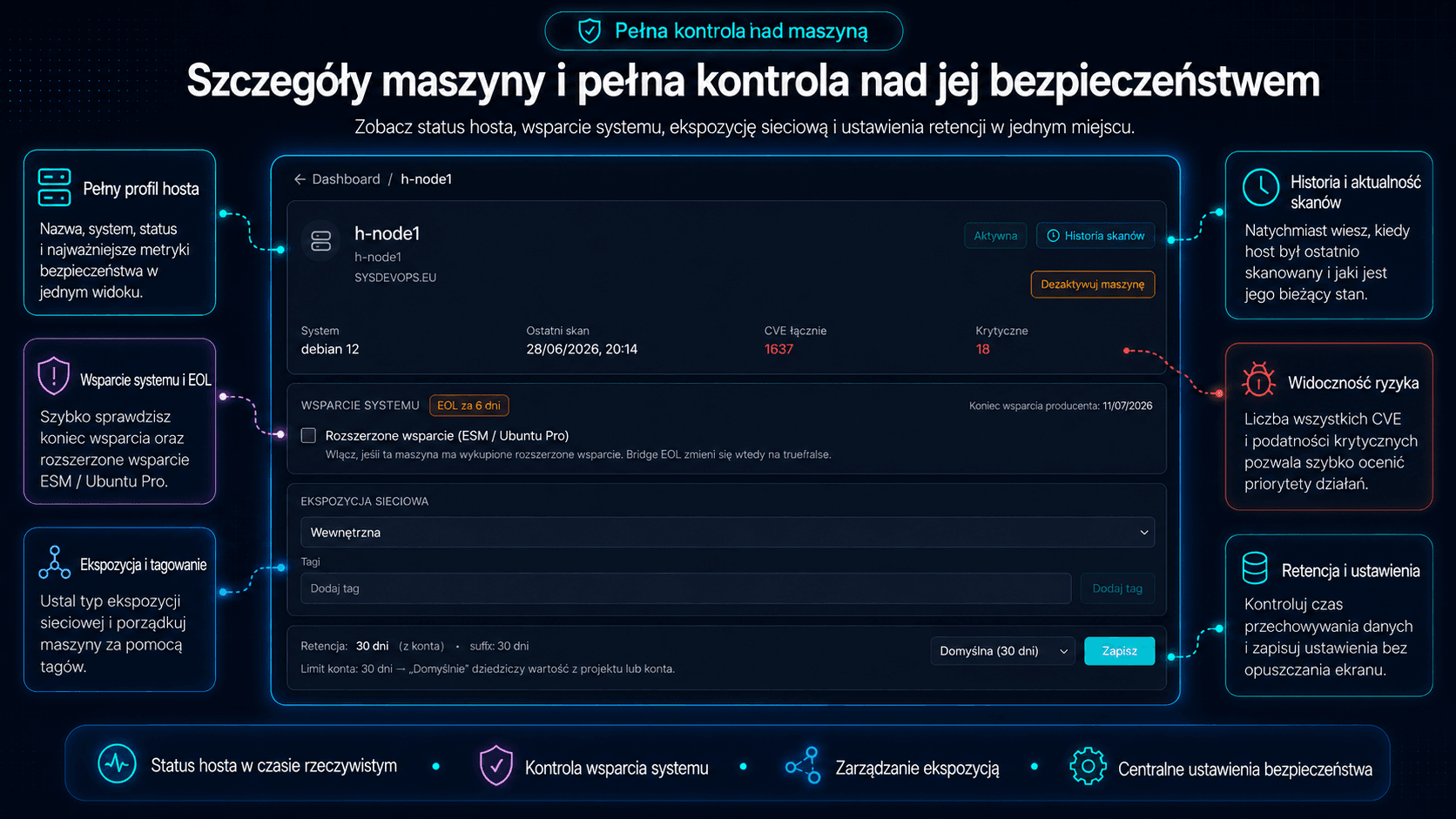
Profil maszyny pokazuje status, skan, wsparcie systemu i ekspozycję.
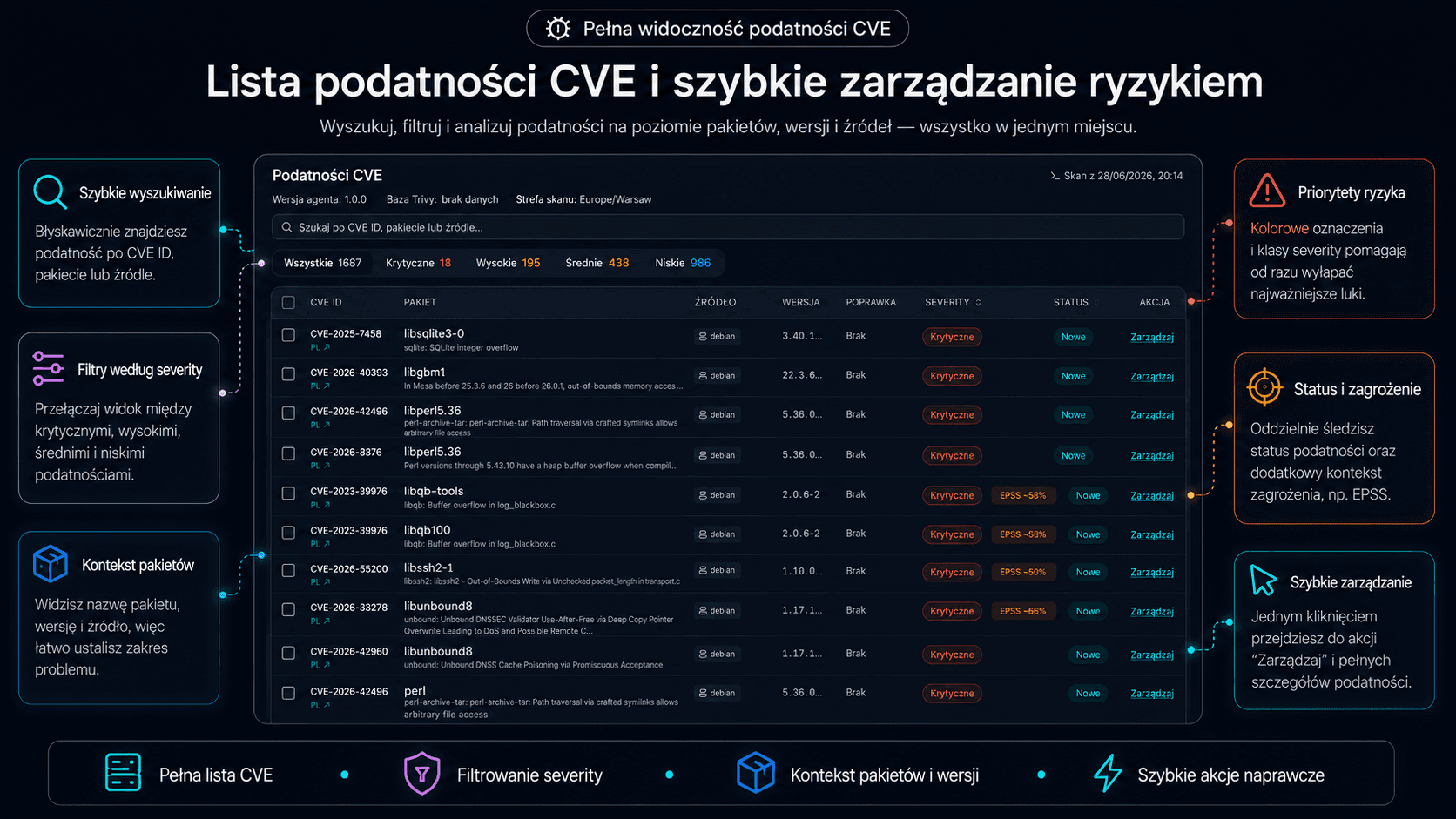
Tabela CVE łączy wyszukiwanie i filtry z danymi pakietów, poprawek i statusów.
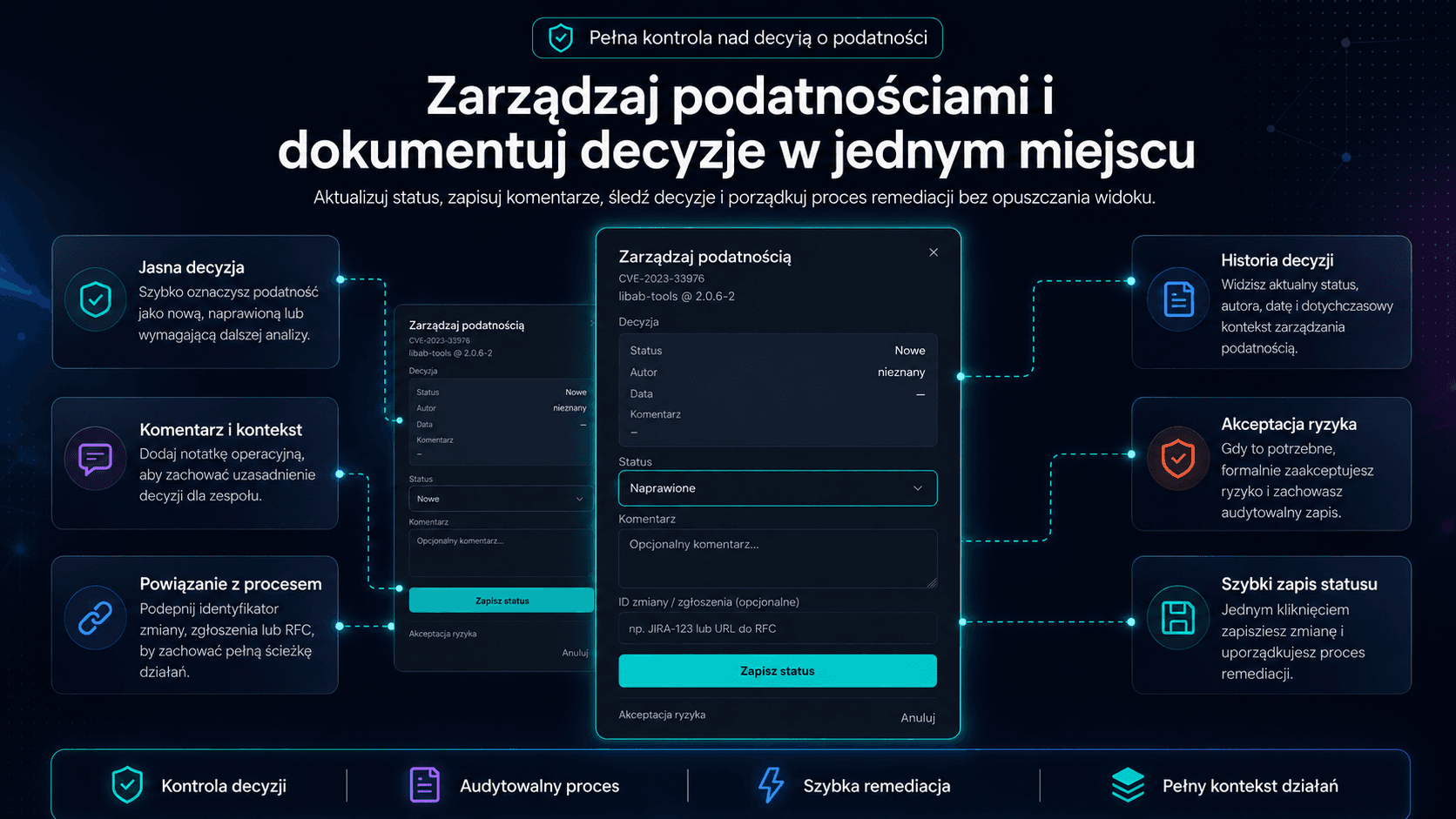
Okno CVE pokazuje decyzję, zmianę statusu i formularz akceptacji ryzyka.
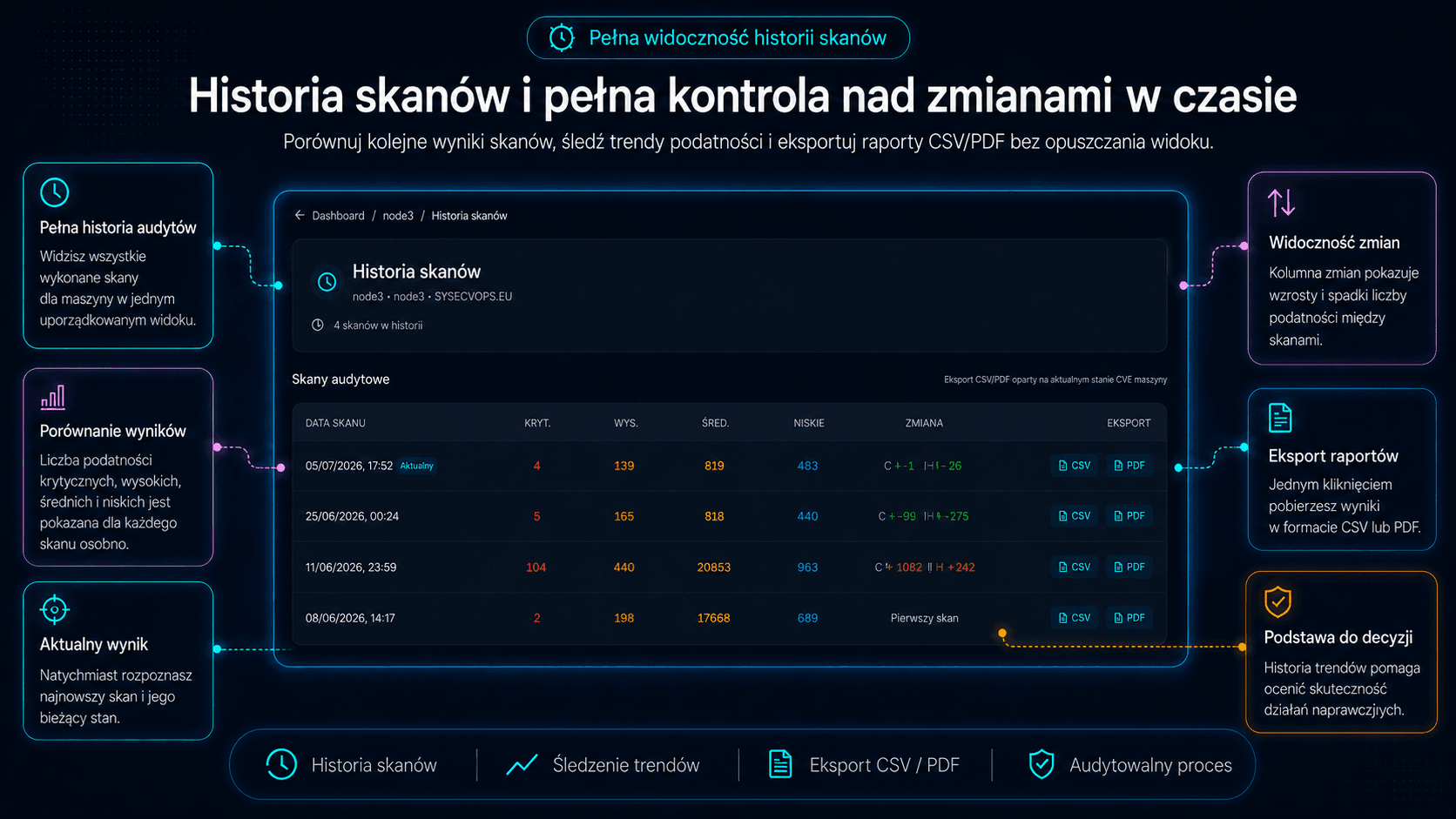
Historia skanów pokazuje liczniki CVE, zmiany i eksport CSV/PDF.
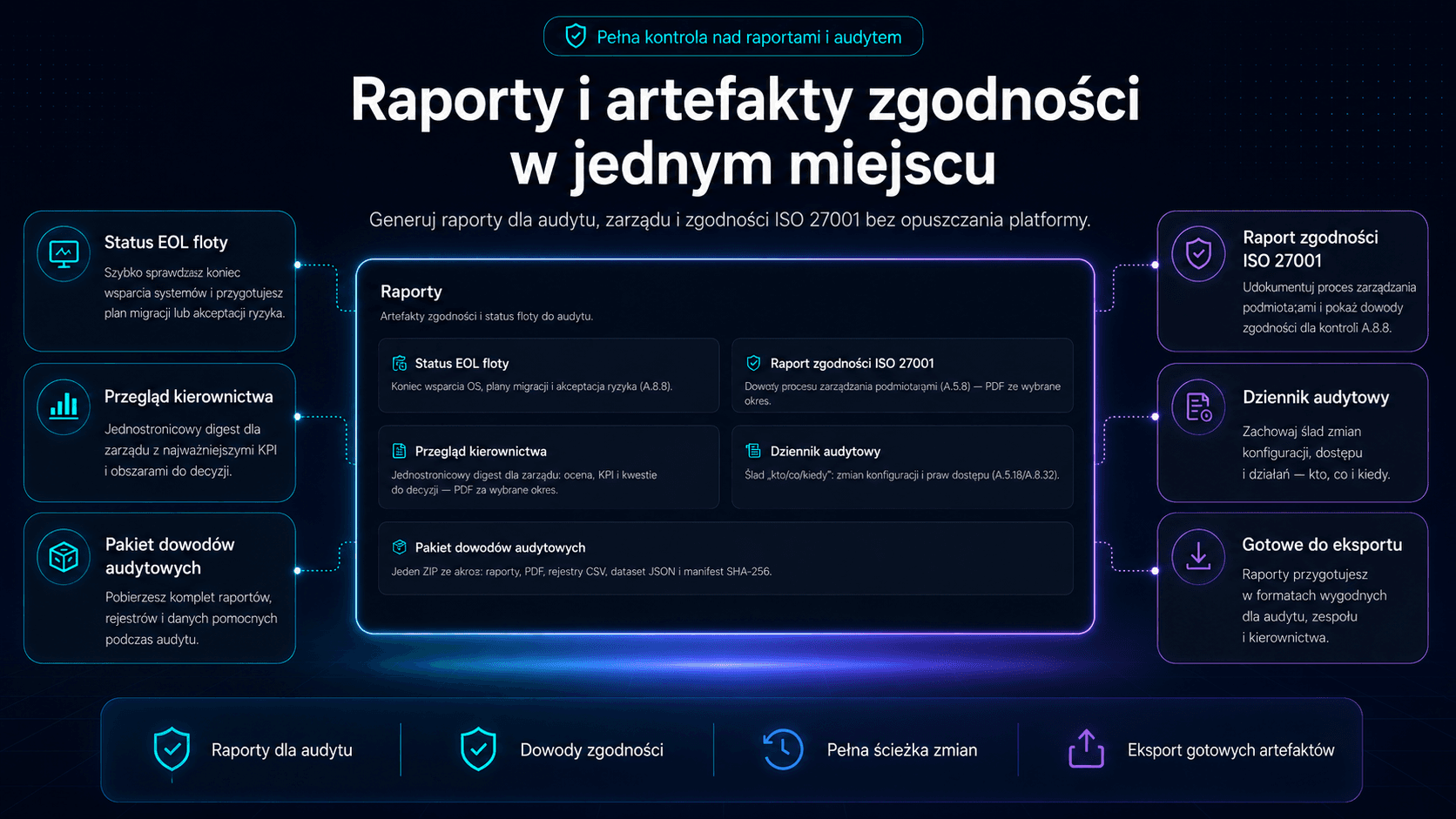
Centrum raportów pokazuje EOL, ISO 27001, raport zarządczy i artefakty audytu.
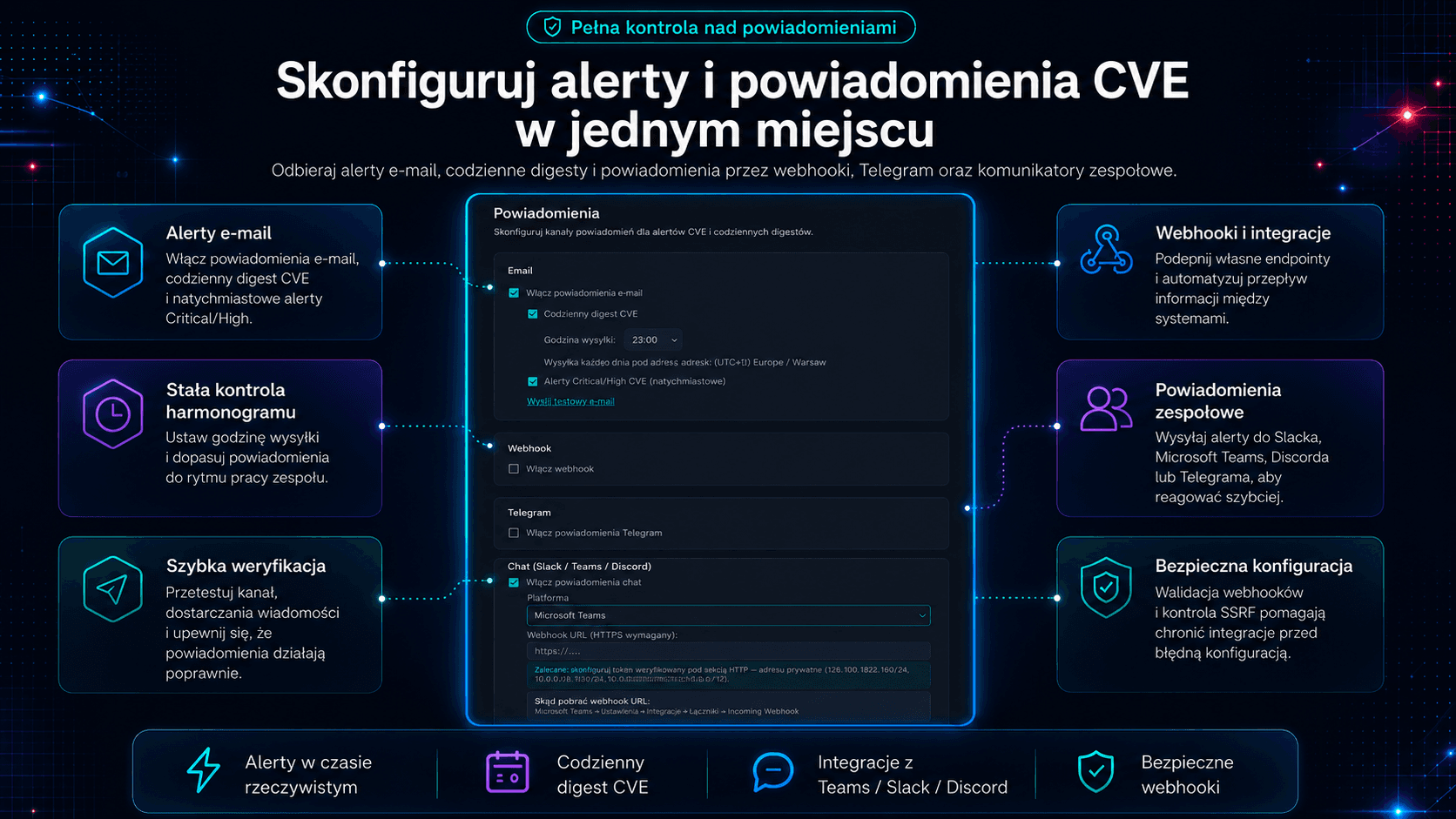
Ustawienia łączą digest i alerty CVE z e-mailem, webhookiem, Telegramem i komunikatorem.
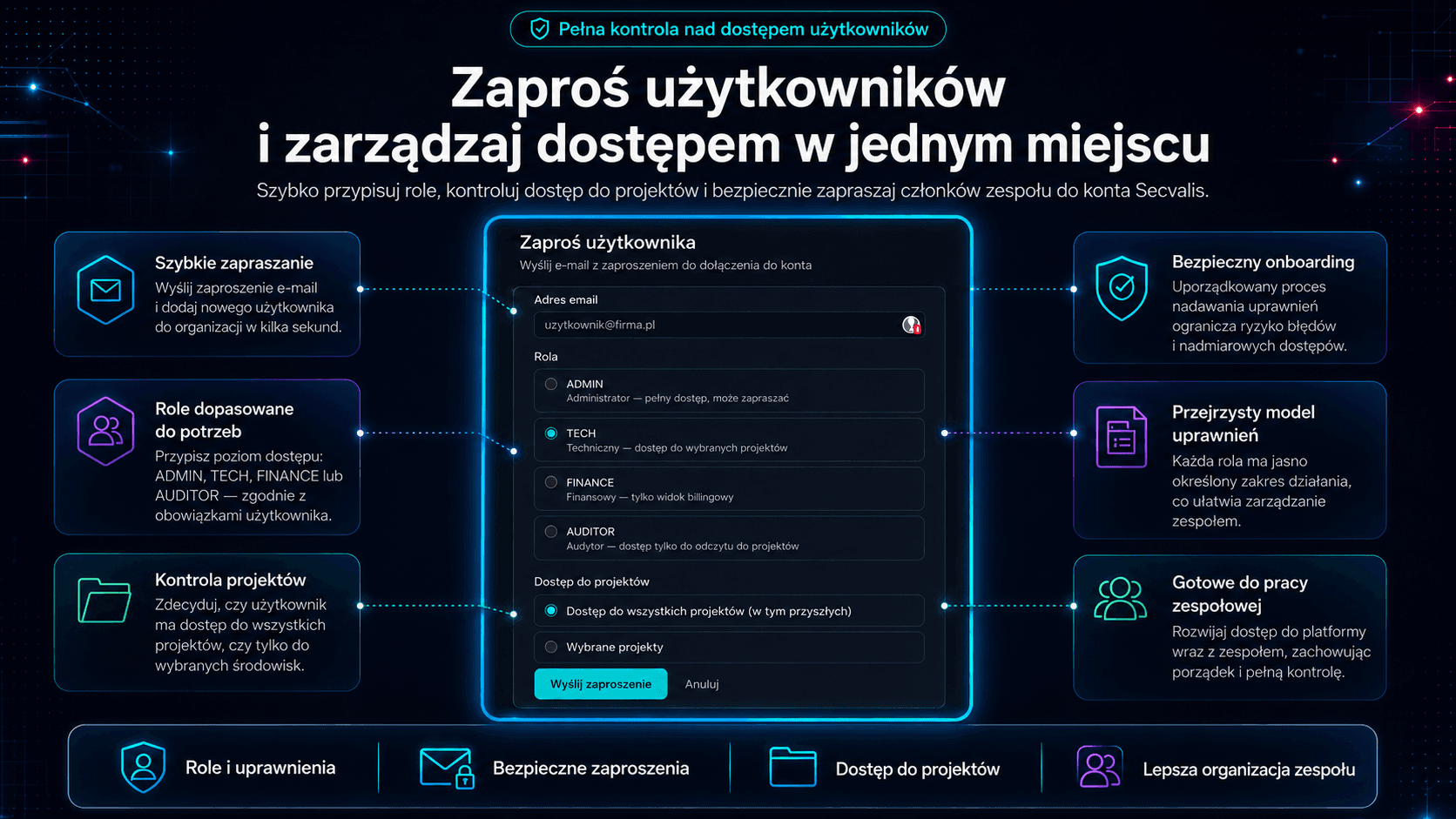
Dla TECH i AUDITOR dostęp do maszyn może być zawężany per projekt.
Czy nie wystarczy darmowy skaner?
Uczciwe porównanie samodzielnego Trivy, Secvalis i skanerów enterprise - razem z tym, czego nam jeszcze brakuje.
Przeczytaj: czy darmowy Trivy wystarczy do KSC?Prosty, przejrzysty cennik
Zacznij za darmo. Bez karty kredytowej.
STARTER
Małe firmy i zespoły
+5 maszyn: 99 zł netto/mies., do 3 pakietów
Wszystko co jest dziś i każda funkcja dodana w przyszłości.
PRO
Rosnące zespoły infrastrukturalne
Wszystko co jest dziś i każda funkcja dodana w przyszłości.
BUSINESS
Większe środowiska i MSP
Wszystko co jest dziś i każda funkcja dodana w przyszłości.
ENTERPRISE
Nieograniczona skala, dedykowane SLA
Wszystko co jest dziś i każda funkcja dodana w przyszłości.
Wszystkie plany zawierają 14 dni bezpłatnego trialu. Zacznij dziś - bez karty kredytowej.
Ceny netto, doliczamy 23% VAT. Zakup online dla firm z Polski. Firma z innego kraju? Napisz do nas, wystawimy fakturę.
Wsparcie bez pośredników: piszesz przez formularz i odpowiada osoba, która zbudowała platformę. Twoje potrzeby wpływają na kolejne wydania.
Policz na własnych liczbach
Twoje godziny i stawka wobec czasu, który zostaje, plus abonament. Wynik może wyjść także na naszą niekorzyść.
Ile kosztuje abonament w przeliczeniu na maszynę
Starter
do 10 maszyn, 199,00 zł miesięcznie
0,66 złza maszynę dziennie
Pro
do 50 maszyn, 649,00 zł miesięcznie
0,43 złza maszynę dziennie
Business
do 200 maszyn, 1999,00 zł miesięcznie
0,33 złza maszynę dziennie
Wpisz swoje liczby i kliknij Policz, żeby porównać to z własną pracą.
Czego nie policzysz w godzinach
Poza odzyskanym czasem abonament obejmuje:
Historia każdego skanu
Historia skanów pokazuje liczniki CVE, zmiany i eksport CSV/PDF.
Lista zadań zamiast listy CVE
Zadania pakietowe porządkują pracę nad podatnościami.
Priorytety z CVSS, EPSS i KEV
CVSS, EPSS i KEV pomagają ocenić podatność.
Terminy naprawy
Konto ustawia terminy naprawy, a próg KEV może je skrócić.
Raport dla zarządu
Raport zarządczy można wysyłać cyklicznie do uprawnionych odbiorców.
Dowody dla audytora
Evidence Pack łączy raporty, rejestry, dane i manifest SHA-256.
Codzienny skan pokazuje, co działo się każdego dnia
Agent Secvalis może skanować maszynę codziennie: wystarczy cron albo timer systemd, gotowe przykłady agent wypisuje po --schedule-help. Zapisane wyniki skanów trafiają do historii maszyny z datą, liczbą podatności według wagi i zmianą względem poprzedniego skanu, więc widać stan z konkretnego dnia, a nie tylko z dnia ręcznego przeglądu. Nieudany skan nie zostawia wpisu, przyczynę pokazuje log agenta na maszynie.
Ręczny przegląd: 1× w miesiącu
Wyników w miesiącu
1
Najdłuższa przerwa
29 dni
bez świeżych danych
Secvalis z harmonogramem dziennym
Wyników w miesiącu
30
Najdłuższa przerwa
0 dni
przy codziennym, udanym skanie
Puste kratki to dni bez wyniku skanu. Liczba ręcznych przeglądów idzie za polem „Razy w miesiącu” z podpowiedzi.
Co zawiera platforma?
Każda funkcja poniżej jest dostępna w każdym płatnym planie - od pierwszego dnia i wraz z rozwojem platformy. Płacisz za sloty maszyn i retencję, nie za odblokowywanie funkcji.
Wszystkie funkcje (32)
Skanowanie CVE przez Trivy
Jeden skrypt bash instaluje Trivy i wykonuje pełny skan OS, zainstalowanych pakietów i uruchomionych kontenerów Docker. Poza maszynę trafiają tylko metadane podatności i podstawowe dane maszyny - żadnych plików, konfiguracji ani sekretów.
Wzbogacanie CVSS · EPSS · KEV
Każde CVE jest automatycznie wzbogacane o ocenę CVSS (0–10), prawdopodobieństwo exploitacji EPSS (%) i flagę CISA KEV. Trzy źródła danych w jednym widoku - wiesz gdzie skupić uwagę jako pierwsze.
Śledzenie statusów remediacji
Oznaczaj pojedyncze CVE jako In Progress, Accepted Risk lub Fixed - bezpośrednio z widoku maszyny. Dostępne akcje masowe. Historia statusów jest zachowywana i eksportowalna.
Historia skanów i analiza trendów
Każdy skan jest przechowywany z deltą względem poprzedniego. Śledź czy postura bezpieczeństwa się poprawia w czasie i natychmiast wykrywaj regresje.
Raport ISO 27001 A.8.8 PDF
Jednym kliknięciem generujesz raport PDF obejmujący pełny proces zarządzania podatnościami: wyniki, akcje remediacyjne i harmonogram. Gotowy dla zewnętrznych audytorów - bez ręcznego zbierania danych.
Governance EOL floty
Widź które maszyny mają systemy z kończącym się wsparciem, ile dni pozostało, kto jest właścicielem migracji, jakie są daty docelowe i decyzje o akceptacji ryzyka. Zgodne z ISO 27001 A.8.9.
Eksport PDF i CSV
Eksportuj dowolny snapshot maszyny lub podsumowanie floty do PDF lub CSV. CSV zgodny z RFC 4180 z BOM dla poprawnego renderowania w Excel. Każdy eksport jest gotowy do audytu.
Pakiet dowodów (jeden ZIP za okres)
Wygeneruj jeden ZIP za dowolny okres audytu: raporty PDF (zarządczy, ISO 27001, EOL), rejestry CSV (akceptacje ryzyka, dziennik audytowy), maszynowo-czytelny dataset JSON i manifest SHA-256. Wręcz audytorowi ISO 27001 / NIS2 jeden integralny pakiet zamiast klikania pięciu osobnych eksportów.
Powiadomienia email i Telegram
Zaplanowany dzienny digest dostarcza nowe CVE do skrzynki lub na kanał Telegram. Wybierasz godzinę wysyłki, liczoną w strefie czasowej konta.
Rola AUDITOR
Zaproś zewnętrznych audytorów lub zespoły compliance jako tylko-do-odczytu. Widzą wyniki i raporty - bez dostępu do kluczy API, rozliczeń ani konfiguracji.
Dziennik audytowy
Kluczowe działania są rejestrowane: kto, co i kiedy. Dziennik tylko do dopisywania, dostępny dla roli AUDITOR, eksportowalny do CSV. Przydatny materiał przy dokumentowaniu procesu na potrzeby ISO 27001 i NIS2.
Wiele projektów w jednym koncie
Podziel maszyny na osobne projekty w jednym koncie, każdy z własnym składem zespołu i raportowaniem. Przydatne dla MSP, holdingów lub zespołów z oddzielnymi środowiskami.
Tłumacz CVE
Opisy CVE z NVD są po angielsku. Wbudowany translator renderuje je po polsku - przyspiesza triage dla zespołów które na co dzień nie pracują po angielsku.
API i integracje
Klucz API projektu, endpoint audytu agenta i eksport Prometheus /metrics - scrapuj podatności swojej floty do własnego Prometheusa i wykresuj na Grafanie.
Rejestr incydentów
Zapisuj incydenty bezpieczeństwa wraz z osią czasu, klasyfikacją i osobami zaangażowanymi. NIS2 nakłada na podmioty objęte ustawą obowiązek zgłaszania incydentów; rejestr trzyma materiał potrzebny do zgłoszenia, zamiast odtwarzania go po fakcie z pamięci.
Zamknięcie okresu
Zamroź zamknięty okres raportowy: zestaw dowodów zostaje zapisany jako snapshot i zahaszowany SHA-256, więc późniejsza zmiana rozjedzie się z zapisanym skrótem. Zamknięcia dokonuje OWNER lub ADMIN, pozostali tylko je odczytują.
Mapa pokrycia dowodami
Zobacz od razu, które wymagania mają już dowody, a które nie - zanim lukę znajdzie audytor. Dostępna dla ról OWNER, ADMIN i AUDITOR.
Polityka zarządzania podatnościami
Pobierz gotowy dokument polityki zarządzania podatnościami, spójny z tym, jak platforma faktycznie działa. Audytor pyta o spisaną politykę, nie tylko o wyniki skanów.
Kolejka: co naprawić najpierw
Lista priorytetów grupuje otwarte podatności w zadania według pakietu i pokazuje kolejność działań. Na kolejność wpływają status KEV i istotność, więc zaczynasz od pakietu, który ma największe znaczenie, a nie od płaskiej listy CVE.
Przypisania i Moje zadania
Przypisz podatność do osoby, a ona otworzy jeden ekran z własnym zakresem pracy. Remediacja przestaje być wspólną listą, za którą nikt nie odpowiada.
Terminowość remediacji (SLA)
Ustal terminy naprawy podatności i śledź, co naprawiono w terminie, co jest po terminie, a co pozostaje poza pomiarem. Ten procent to liczba, o którą pyta audytor.
Logowanie dwuskładnikowe (TOTP)
Zabezpiecz samo konto: TOTP z dowolnej aplikacji uwierzytelniającej, kody odzyskiwania i zaufane urządzenia, plus wylogowanie ze wszystkich urządzeń jednym kliknięciem. Włączane per użytkownik, w każdym planie.
Slack, Teams, Discord i webhooki
Alerty o nowych CVE i digesty trafiają tam, gdzie zespół już pracuje. Każdy przychodzi jako natywna karta, nie surowy link: Slack Block Kit, Teams Adaptive Card, Discord embed. Jest też uniwersalny webhook do własnych narzędzi i przycisk Testuj, żeby potwierdzić dostarczenie, zanim na tym polegniesz.
Cykliczny raport zarządczy
Tygodniowy albo miesięczny PDF dla zarządu, wysyłany mailem według własnego harmonogramu. Cykl ustawiasz per konto, a ten sam raport pobierzesz z panelu w dowolnym momencie.
Kontekst znaleziska
Kontekst odróżnia pakiety nieuruchomionego jądra od przypadków wymagających restartu, więc znalezisko nie jest czytane jak zwykłe zadanie „zainstaluj aktualizację”.
Decyzje „nie dotyczy”
Ważna decyzja pakietowa może oznaczyć objęte nią podatności jako „nie dotyczy”, z uzasadnieniem i terminem przeglądu. Raport ISO pokazuje je w osobnej sekcji poza SLA, z podanym powodem.
Kontekst maszyny w priorytetach
Krytyczność maszyny i jej ekspozycja wpływają na kolejność napraw. Istotność podatności pozostaje bez zmian, zmienia się tylko kolejność pracy.
Werdykt dla zarządu
Werdykt raportu zarządczego wynika z terminowości SLA, luk rejestru, starych skanów, luk EOL i decyzji o ryzyku. Sama liczba CVE go nie wyznacza.
Kontrola kompletności rejestru
Kontrola na poziomie maszyny porównuje ostatni pełny skan z rejestrem SLA. Wskazuje brak wpisów albo rejestr, którego najnowszy wpis jest starszy od skanu.
Ochrona przed fałszywym zamknięciem
Skan oznaczony jako nieudany lub częściowy nie zamyka podatności w rejestrze. Zabezpieczenie blokuje też zamknięcia przy wykrytym gwałtownym spadku liczby znalezisk.
Rejestr przeglądów dowodów
Zapisuje lokalizację dowodu, jego właściciela, cykl i historię przeglądów. Stan przeglądu wynika z tych danych.
Role per projekt
Dla ról TECH i AUDITOR z przypisanymi projektami dostęp do maszyn jest ograniczony do maszyn tych projektów.
Audytujesz albo wdrażasz KSC/NIS2 lub ISO 27001? Twoje konto jest bezpłatne.
Pełne konto, bez ekranów płatności i bez prowizji od czegokolwiek. Pracujesz w Secvalisie tak samo jak Twoi klienci, więc znasz dowody, zanim o nie poprosisz.
Poznaj warunki i zgłoś sięNajczęściej zadawane pytania
Produkt i zakres
Czym Secvalis różni się od samego Trivy?
Trivy to świetny skaner - ale skaner daje Ci listę CVE, nie proces. Secvalis dokłada wszystko, czego wymaga audyt i codzienna praca: centralny rejestr wszystkich maszyn, priorytetyzację (CVSS + EPSS + KEV), statusy i decyzje z audit trail, raporty dla zarządu i audytora, powiadomienia oraz historię w czasie. Krótko: Trivy odpowiada na pytanie „co jest podatne teraz na tej maszynie”, Secvalis - „jak wygląda i jak jest udokumentowany proces zarządzania podatnościami w całej firmie”.
Jakie systemy są wspierane?
Serwery Linux: Ubuntu, Debian, RHEL, CentOS, Rocky Linux, AlmaLinux, Fedora i Alpine, a także obrazy oraz kontenery Docker. Inne dystrybucje są wykrywane przez Trivy. Wsparcie dla Windows Server jest na roadmapie - jeśli Windows jest dla Ciebie krytyczny, napisz do nas; priorytetyzujemy roadmapę razem z klientami.
Czy muszę instalować agenta?
Instalujesz jeden jawny skrypt (secvalis.sh), uruchamiany cyklicznie z crona lub timera systemd. To nie jest stale działający demon: między skanami na serwerze nic nie działa. Skrypt wywołuje lokalny skan i wysyła metadane wyników oraz podstawowe dane maszyny. Możesz go przeczytać przed uruchomieniem.
Co dokładnie opuszcza moją maszynę?
Wyłącznie metadane niezbędne do zarządzania podatnościami: etykieta i nazwa hosta, dystrybucja i jej wersja, wersja agenta, strefa czasowa, status skanu, lista pakietów z podatnościami wraz z wersjami oraz wykryte identyfikatory CVE. Nigdy: pliki, konfiguracje, zmienne środowiskowe, sekrety ani dane użytkowników. Pełną, dokładną specyfikację wysyłanego payloadu opisujemy w dokumentacji.
Czy mogę używać Secvalis w środowisku odizolowanym (air-gapped)?
Obecnie nie - wysyłka wyników wymaga połączenia HTTPS z api.secvalis.eu. Tryb proxy/relay dla sieci odizolowanych rozważamy; napisz, jeśli go potrzebujesz.
Dane i bezpieczeństwo
Gdzie przechowywane są moje dane?
W Unii Europejskiej - infrastruktura hostingowa OVHcloud (OVH SAS), serwery w Warszawie (Polska, EOG). Pełną listę podprocesorów (w tym dostawcę wysyłki e-mail) znajdziesz w Polityce prywatności.
Czy podpisujecie umowę powierzenia przetwarzania danych (DPA)?
Tak. DPA jest integralną częścią Regulaminu (realizacja art. 28 RODO) i jest zawierana elektronicznie już przy rejestracji. Pełną treść znajdziesz pod adresem /umowa-powierzenia; na żądanie udostępniamy ją do pobrania w formacie PDF i dopuszczamy podpis kwalifikowany (dla klientów wymagających podpisanego egzemplarza).
Jak zabezpieczona jest sama platforma Secvalis?
Szyfrowanie TLS 1.2+ w tranzycie, dziennik kluczowych działań użytkowników tylko do dopisywania (dostępny dla roli audytora), uwierzytelnianie dwuskładnikowe (MFA/TOTP), role i kontrola dostępu oraz izolacja danych każdego konta. Kopie zapasowe są szyfrowane (restic) przed wysłaniem do magazynu - dostawca infrastruktury nie ma dostępu do danych w postaci jawnej.
Ceny i konto
Co się dzieje po zakończeniu triala?
Konto przechodzi w 7-dniowy okres karencji (grace period), w którym działa normalnie - nic nie kasujemy, masz czas na decyzję i eksport danych. Dopiero po nim maszyny są dezaktywowane (przestają się skanować), a dane pozostają dostępne do wglądu i pobrania. Karty nie podpinasz na starcie, więc nie ma ryzyka automatycznego obciążenia.
Mam 11 serwerów, a plan Starter ma 10 slotów. Muszę kupić droższy plan?
Napisz do nas - pomożemy dobrać plan albo omówić dokupienie pojedynczych slotów maszyn ponad limit. Nie chcemy, żebyś płacił za cały wyższy plan z powodu jednej maszyny.
Czy w niższych planach są wyłączone funkcje?
Nie. Płacisz za liczbę maszyn i długość retencji danych, nie za odblokowywanie funkcji. Raporty, Evidence Pack, role, API - wszystko jest dostępne w każdym planie.
KSC / NIS2 / ISO
Czy wdrożenie Secvalis wystarczy do zgodności z NIS2 / ustawą o KSC?
Nie - i nieufnie podchodź do każdego narzędzia, które twierdzi inaczej. Ustawa wymaga całego systemu zarządzania bezpieczeństwem informacji (SZBI). Secvalis zamyka jeden z jego obowiązkowych elementów: proces obsługi podatności wraz z inwentaryzacją i dowodami dla audytora.
Jak Secvalis mapuje się na ISO 27001?
Bezpośrednio wspieramy kontrole: A.8.8 (zarządzanie podatnościami technicznymi), A.8.9 (zarządzanie konfiguracją - inwentarz pakietów) oraz A.5.18 (prawa dostępu - role i audit trail w samej platformie). Evidence Pack jest projektowany tak, by audytor dostał dowody w formacie, którego oczekuje.
Zobacz, jak to działa na koncie demo
Obejrzyj demo bez rejestracji albo zacznij trial. Pierwszy skan trwa kilka minut, a zobowiązań nie ma.
Pytania? Napisz do nas
Co to jest CVE?
Każda podatność ma unikalny identyfikator CVE. Platforma wzbogaca każde CVE o prawdopodobieństwo exploitacji EPSS, status KEV i ocenę CVSS - zawsze wiesz, gdzie skupić uwagę najpierw.
Common Vulnerabilities and Exposures
Ustandaryzowany identyfikator (np. CVE-2024-1234) dla każdej publicznie znanej podatności bezpieczeństwa.
National Vulnerability Database
Oficjalny rządowy rejestr CVE (USA) wzbogacony o oceny CVSS i szczegóły techniczne.
Common Vulnerability Scoring System
Skala 0–10 oceniająca stopień ryzyka: Critical (9–10), High (7–8.9), Medium (4–6.9), Low (0–3.9).
Exploit Prediction Scoring System
Prawdopodobieństwo (0–100%) że podatność zostanie aktywnie wykorzystana w ciągu 30 dni.
Known Exploited Vulnerabilities
Lista CISA z CVE potwierdzonymi w realnych atakach. Najwyższy priorytet łatania - brak wymówek.
End of Life / Koniec wsparcia
Data po której producent przestaje wydawać łatki bezpieczeństwa. Maszyny na EOL OS to najwyższa kategoria ryzyka.
Skala CVSS Severity
Flaga KEV nadpisuje każdą ocenę CVSS - podatność aktywnie wykorzystywana wymaga natychmiastowego działania niezależnie od wyniku liczbowego.
Najnowsze z bloga
Zgodność, podatności i dowody dla audytora
Nie wszystko da się załatać od razu. Jak podjąć decyzję, którą obronisz
Poprawka jest, ale jej instalacja zatrzyma usługę albo zepsuje aplikację dostawcy. Odroczenie aktualizacji może być uzasadnione oceną ryzyka, jeśli ktoś je świadomie podjął, w tym czasie działają inne zabezpieczenia, a decyzja ma datę przeglądu. Samo zapisanie decyzji nie zwalnia z obowiązku działania. Jak to zrobić, żeby za rok dało się tę decyzję obronić.
- KSC
- NIS2
- Ryzyko
Pierwszy serwer: jedna komenda i wynik w panelu
Pobranie agenta, pierwszy skan Linux i sprawdzenie wyniku. Dlaczego harmonogram trzeba skonfigurować osobno.
- Linux
- Wdrożenie
800 podatności, jeden administrator. Co zrobić w tym tygodniu
Lista z setkami podatności to zwykle dużo mniej pakietów do aktualizacji, z czego kilka naprawdę pilnych. Jak zamienić listę, która paraliżuje, w plan na tydzień, który da się wykonać i obronić.
- Podatności
- Priorytetyzacja
- NIS2